| Uploader: | Detonatorx |
| Date Added: | 01.01.2018 |
| File Size: | 24.20 Mb |
| Operating Systems: | Windows NT/2000/XP/2003/2003/7/8/10 MacOS 10/X |
| Downloads: | 49946 |
| Price: | Free* [*Free Regsitration Required] |

Download PDF Editor - latest version
12/17/ · Free PDF Editor, free and safe download. Free PDF Editor latest version: Free PDF creation app. Free PDF Editor is a free PDF creator with a really misleading name. Despite claiming to edit PDF. 12/8/ · Free PDF Editor Free & Safe Download! Free PDF Editor Latest Version! Works with All Windows versions; Users choice! Disclaimer. Free PDF Editor is a product developed by blogger.com This site is not directly affiliated with blogger.com All trademarks, registered trademarks, product names and company names or logos mentioned. PDF Editor is an application that as you can gather from its name, is designed to modify documents in PDF format. PDF Editor is easy to use, as it works through a comfortable and intuitive interface in which we will easily find all the options the program has. To edit the document content, PDF Editor first identifies the elements of the page so.

Download pdf editor
It's not easy to find a truly free PDF editor that lets you not only edit and add text but also change images, add your own graphics, sign your name, fill out forms, download pdf editor, etc. Below, however, is a list of exactly what you're looking for. Some of these are online PDF editors that work right in your web browser, so all you have to do is upload your PDF file to the website, make the changes you want, and then save it back to your computer.
Because not all of these download pdf editor PDF editors support the same features, and some are restricted in what you can do, remember that you can process the same PDF in more than one tool. For example, use one to edit the PDF text if that's supportedand then put the same PDF through a different editor to do something supported in that program for example, to edit a form, update an image, or remove a page.
If you don't need to change the contents of the PDF but instead just need to change it to another file format such as, download pdf editor. Most editors only let you edit the text you add yourself, or they support text editing but then throw watermarks all over the place. Plus, this tool can run entirely in your web browser, so it's easy to get going without having to download any programs. You can get the desktop version if you'd rather use it that way. There are some differences between the online and desktop versions that you should know about.
For example, the desktop edition supports more font types and doesn't let you add PDFs by URL or from online storage services as the online editor does which supports Dropbox, download pdf editor, OneDrive, and Google Drive. All uploaded files are automatically deleted from Sejda after two hours.
This online PDF editor works no matter which operating system you use. Inkscape is an extremely popular free image viewer and editor, but it also includes PDF editing functions that most dedicated PDF editors support only in their paid editions.
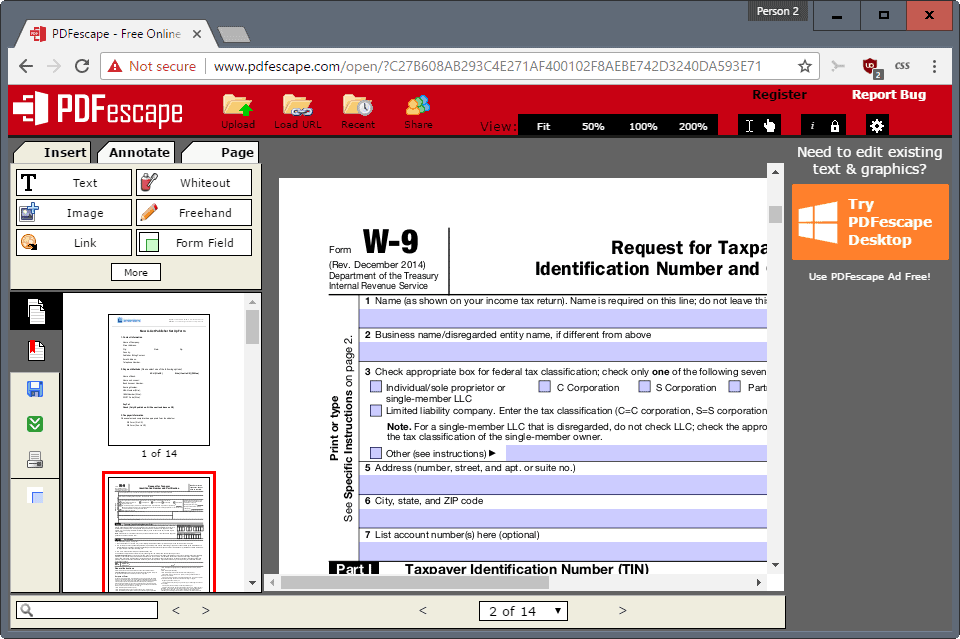
Inkscape is a very capable download pdf editor editing program. If you're not already familiar with programs like GIMPAdobe Photoshopand other image editors, however, it's probably a bit advanced for you. PDFescape has quite a lot of features. The text tool is very customizable so that you can pick your own size, font type, color, alignment, and apply effects such as bolding, underlining, and italics.
You also can draw on the PDF, add sticky notes, strikethrough text, put white space over anything you want to disappear, and insert lines, checkmarks, arrows, ovals, circles, rectangles, and comments. PDFescape lets you delete individual pages from the PDF, rotate download pdf editor, crop out parts of a page, reorganize the order of the pages, download pdf editor add more pages download pdf editor other PDFs.
When finished editing, download pdf editor, you can download the PDF to your computer without ever having to make a user account. You need one only if you want to save your progress online without downloading the PDF.
The download pdf editor version of PDFescape works in all operating systems. If you use a non-free feature, the PDF will save with a watermark on every page.
If you stick to just the free features, however, you can still do some editing to the file and save it back to your computer. You can save the edited PDF back to your computer or to any of those cloud storage services, download pdf editor. All of the options and tools are simple to understand, however, and they're categorized into their own sections for easier management.
One nice feature is the ability to highlight all the form fields so that you can easily spot where you need to fill in. This is really helpful if you're editing a PDF with lots of forms, download pdf editor, such as an application. Although the free version puts watermarks on your edited documents, this program does let you edit existing text, download pdf editor, add your own text to the PDF, and add or delete pages from the document.
You can download this program in portable mode to use on a flash drive or as a regular installer. Many of the features are free, but some are not. If you use a feature that's not covered by the free version you're told which features are not free when you use themthe saved PDF file will have a watermark attached to the corner of every page. One of the quickest ways to add images, text, shapes, or your signature to a PDF is with Smallpdf.
This website allows you to upload a PDF, make changes to it, and then save it back to your computer all without needing to make a user account or pay for any anti-watermarking features. You can open files from your computer or your Dropbox or Google Drive account. Importing shapes is possible if you want a rectangle, square, circle, arrow, or line. You can change the object's main color and line color, as well as the thickness of its edge.
Text size can be small, regular, medium, large, or extra large, but you can't change the font type, just the color, download pdf editor. When finished editing the PDF, you can decide where you want it saved; to your device download pdf editor your Dropbox account. You can also generate a share link that anyone can use to download the PDF; it'll last two weeks. Something else you can do is run the document through Smallpdf's PDF splitter tool if you want to extract the pages.
Smallpdf works with all operating systems that support a modern web browser. One of the neat things about editing PDFs with LibreOffice Draw is that the program is made for creating and manipulating objects, so you can just as easily edit non-text things, too, like images, headings, colors, etc, download pdf editor. LibreOffice runs on Windows, Mac, and Linux. When you save to a PDF file, download pdf editor, there's even a password option to secure the document, download pdf editor.
Files can be download pdf editor back to your computer or imported directly into Google Drive or Dropbox. PDFelement, just as the name sounds, is free but with a major limitation: It places a watermark on every page of the PDF. That being said, the watermark is behind everything, so you can still see the content, and it's important to realize that it supports some truly great PDF editing features.
This program would be a truly free PDF editor if it weren't for the fact that the free edition will not save without first putting a download pdf editor on every single page of the PDF. Depending on what you'll use the PDF for, however, the features it supports might be enough for you to consider living with the watermarks. Download For :. Apps Best Apps Payment Services. Tweet Share Email.
What We Like. What We Don't Like. Visit Sejda. Our Review of Inkscape. Download Inkscape. Visit PDFescape. Visit Smallpdf. Our Review of LibreOffice. Download LibreOffice. More from Lifewire.
Top 5 Best Free PDF Editors (Adobe Acrobat Alternatives)
, time: 9:37Download pdf editor
12/2/ · PDF BOB is a free online PDF editor that requires no user account. Just upload your PDF, make the changes you need to, and then export it to PDF again to finish up. There are several tools here to edit your PDF, like a text tool that lets you select a custom color and font type, an image picker, a colored pencil/marker, and a few shape tools. 12/8/ · Free PDF Editor Free & Safe Download! Free PDF Editor Latest Version! Works with All Windows versions; Users choice! Disclaimer. Free PDF Editor is a product developed by blogger.com This site is not directly affiliated with blogger.com All trademarks, registered trademarks, product names and company names or logos mentioned. Pdf Editor free download - Classic PDF Editor, PDFill Free PDF Editor Basic, Infix PDF Editor, and many more programs.

No comments:
Post a Comment